

Hybrid events are now a major part of the event landscape, combining virtual and in-person experiences. But managing these events efficiently requires the right tools to handle registrations, attendee engagement, and data synchronization. Here’s a quick overview of five tools that simplify hybrid event management:
- Zoom Integration: Connects with over 8,000 apps, supports virtual and in-person attendee tracking, and offers flexible pricing.
- Cvent CRM Sync: Directly links with CRMs like Salesforce and HubSpot, enabling real-time data updates and lead management.
- Zapier Workflows: Automates tasks across 8,000+ apps, making it easier to manage attendee journeys and hybrid workflows.
- RingCentral Events API: Offers advanced features like badge printing, attendee engagement tools, and scalability for large events.
- Eventbrite: Combines ticketing with marketing automation, providing tools to track both in-person and virtual participation.
Each tool offers unique features to address the complexity of hybrid events, from automating workflows to integrating CRM systems. Below, explore how these platforms compare and which one might work best for your needs.
Zoom Events: Developing hybrid event innovations
1. Zoom Integration
Zoom works seamlessly with over 8,000 apps via Zapier and directly syncs with CRMs like Salesforce, HubSpot, and Marketo, as well as platforms like Eventbrite and Swoogo. These integrations help capture attendee engagement and simplify registration for both virtual and in-person events.
Integration Capabilities
Zoom’s integration system uses QR codes to bridge physical and digital data. For example, QR codes at sponsor booths can feed interaction data directly into CRMs, tracking details like virtual watch time. With Zapier triggers such as "New Registrant" or "New Session", workflows become automated – registrants from web forms can be added to Zoom and tagged for email campaigns.
"By incorporating Swoogo’s customizable event management capabilities with Zoom’s digital platform, our customers can enjoy seamless planning and hosting, even for the most complex hybrid events." – John Beckmann, Head of Zoom Events
These integrations make it easier to manage events with large numbers of attendees.
Scalability for Hybrid Events
Zoom’s integrations are key to its ability to scale for hybrid events. The platform allows venues to sell out their physical spaces while still enabling unlimited virtual registrations. At Zoomtopia, for instance, the platform supported 33,000 global attendees. One organization reported a 125% boost in attendance after adopting Zoom Events, while Honeywell cut over $1 million annually in production costs. Zoom is also built to handle multi-day, multi-track events and can scale workshops to accommodate hundreds of remote learners at once.
Cost-Effectiveness
Zoom’s pricing options are designed to fit various event needs. Users can choose between a subscription plan – offering unlimited events with a set attendee capacity – or a pay-per-attendee model for one-time events, where costs are based on actual attendance. This flexibility works well for everything from recurring meetings to major conferences. The subscription plan also includes full webinar features with options for monthly or annual billing.
Hybrid-Specific Features
Zoom enhances hybrid events by integrating physical and virtual attendee experiences. The Zoom mobile app allows real-time chat between in-person and remote participants, creating a unified experience. Features like "Tiles for Zoom" project virtual attendees onto physical room screens. For example, at a national convention in August 2024, production agency BC Live used this feature to stretch the virtual audience across an entire stage LED screen during the finale. Additionally, a unified analytics dashboard combines QR-based in-person tracking with automatic virtual metrics, giving event planners a complete view of attendee engagement.
2. CRM Sync with Cvent
Cvent integrates seamlessly with major CRMs like Salesforce, HubSpot, and Marketo, cutting out the need for manual data entry. This connection allows event data to flow effortlessly between systems – automatically creating leads or contacts based on attendee actions and generating Salesforce opportunities for participants. Registration forms pull attendee details directly from your CRM, auto-filling fields and customizing the registration process for each individual. Much like Zoom, Cvent simplifies hybrid event management by connecting otherwise separate systems.
Integration Capabilities
Cvent supports over 90 native enterprise integrations, along with options like REST APIs, webhooks, and pre-built connectors, all accessible through its Developer Hub. When attendees register, the platform can create Salesforce tasks and add them to invite lists. It also allows bulk record imports and exports for targeted campaigns, while updating campaign member statuses in real time to track engagement. For more specific needs, Cvent offers an App Marketplace to link with additional SaaS tools.
Scalability for Hybrid Events
Cvent uses "Full Refresh" and "Incremental Sync" modes to ensure accurate data management, regardless of event size[24,25]. The platform monitors the entire attendee journey, providing insights into interests and readiness to buy based on prior event behavior. By syncing event activity, like session attendance or cancellations, with existing CRM records, organizers can create richer customer profiles. This integration ensures a consistent experience and accurate reporting for both virtual and in-person attendees. Additionally, exhibitors can use QR-based lead capture tools to sync leads directly into CRM systems for immediate follow-up after events.
Cost-Effectiveness
The cost of native integrations in event management software can range from free to over $2,000, depending on the provider and package. Cvent offers flexible pricing, including a pay-as-you-go option at $3.95 per registrant plus a 1.95% platform fee, or custom annual contracts for enterprise clients. For example, a $500 ticket might result in approximately $30 in fees, plus any setup costs. Custom API integrations, on the other hand, can range from $2,000 to $10,000 per event for professional development.
Hybrid-Specific Features
A unified CRM sync is key to blending virtual and in-person attendee engagement. Cvent’s sync capabilities allow for personalized event experiences through dynamic registration processes and targeted follow-ups based on lead scoring. Organizations can connect Cvent events directly to CRM campaigns, tracking "Closed Won" opportunities and building ROI dashboards. For hybrid events, features like nomination-based invitations ensure that only approved participants receive registration links. Regardless of how attendees participate, the platform maintains consistent data, enabling organizations to measure the impact of hybrid events on sales and revenue.
3. Zapier for Custom Workflows
Zapier connects more than 8,000 apps and 450 AI tools, making it easy to link physical ticketing platforms like Eventbrite with virtual venues such as Zoom Events, RingCentral, or Whova. It automates nearly every step of the attendee journey – from capturing registrations instantly and enriching profiles to logging attendance in real time and managing follow-ups after the event. With this cross-platform synchronization, both in-person and virtual attendees can enjoy a smooth experience, with no coding needed. This automation framework simplifies event management across multiple platforms.
Integration Capabilities
Zapier uses tools like "Webhooks by Zapier" for custom endpoints and "Formatter by Zapier" for cleaning up data. For example, you can set it up to automatically create redeem codes in RingCentral Events as soon as someone buys a ticket on Eventbrite, ensuring virtual attendees have easy access. The platform also offers tools like "Paths" for multi-branch workflows and "Filter" for setting conditional logic. These features are perfect for managing different ticket types or organizing complex hybrid schedules. Importantly, Zapier complies with SOC 2 and GDPR standards, ensuring data security.
With these integration tools, managing workflows for events of all sizes becomes much simpler.
Scalability for Hybrid Events
Zapier’s "Zapier Canvas" takes things further by offering a visual tool to map out complex hybrid workflows. Its enterprise-grade infrastructure ensures reliability, no matter the scale of your event. The platform uses a task-based system, where only successful data transfers count as tasks. Triggers and tools like Filters are excluded from task counts, keeping costs manageable. For large events, Zapier’s pay-per-task system provides a safety net, allowing automations to continue running at 1.25× the base task cost if you exceed your monthly limit, rather than stopping entirely. On the Free plan, Zapier checks for updates every 15 minutes, which works for smaller events, but larger or time-sensitive events might require an upgraded plan.
Cost-Effectiveness
Here’s a breakdown of Zapier’s plans to help you pick the right one for your event:
| Plan | Starting Price (Annual) | Key Features for Events | Ideal Event Size |
|---|---|---|---|
| Free | $0 | 100 tasks/month, Two-step Zaps | Testing/Small meetups |
| Professional | $19.99/month | Multi-step Zaps, Webhooks, Premium Apps | Small to mid-sized events |
| Team | $69/month | 25 users, Shared app connections, Support | Team-led collaborative events |
| Enterprise | Contact Sales | Annual task limits, Unlimited users, Security | Large-scale conferences |
For small or occasional events, the Professional plan provides access to multi-step Zaps and premium apps like Salesforce or Zendesk, which are often essential for professional workflows. Larger hybrid events benefit from the Enterprise plan, which includes annual task limits to help avoid budget concerns during months with high registration numbers. Non-profit organizations can also take advantage of a 15% discount, making it a cost-conscious option for charity events.
Hybrid-Specific Features
Zapier enhances the hybrid event experience by automatically syncing physical attendees with virtual platforms. It can also send notifications through Slack, SMS, or Gmail when attendees check in or register, keeping staff informed and responsive. Features like "AI by Zapier" and "Human in the Loop" draft personalized introductory emails for VIP guests, combining high-quality outreach with automation. Additionally, real-time data consolidation ensures that check-ins and registrations are logged into centralized databases like Airtable or Google Sheets, providing live updates on participation.
"Event management automation is the process of using technology to coordinate attendees, store event details in sheets, send real-time updates for event changes, and complete related tasks, all without manual effort." – Michael Toth, Automation and AI Consultant at Snowline Automation
sbb-itb-1e56dfa
4. RingCentral Events API
RingCentral Events API takes hybrid event management to the next level by seamlessly connecting physical and digital event platforms. It offers a range of tools, including public and custom APIs, webhooks, and over 40 pre-built integrations with systems like Salesforce, HubSpot, Marketo, and Cvent. These features make syncing attendee data across CRMs and marketing platforms a breeze. For in-person events, it supports badge printing, kiosk-based self-check-in, lead retrieval, and even digital floor plan management, simplifying onsite logistics.
Integration Capabilities
This API ensures smooth synchronization of event data. Webhooks automatically update CRMs when attendees check in, whether onsite or virtually. It also integrates engagement tools like Slido and Kahoot! directly into the attendee app, enabling participants to take part in polls and quizzes effortlessly. Developers have access to SDKs for JavaScript, Python, PHP, and Ruby to build custom applications, while interaction data and engagement scores can be exported to external databases like Airtable for further analysis.
Scalability for Hybrid Events
RingCentral Events is designed to handle large-scale hybrid events, accommodating up to 10,000 attendees per session. The platform’s infrastructure dynamically adjusts bandwidth to manage traffic spikes. For instance, SAE International used the platform in 2025 to host a hybrid event with over 10,000 attendees, generating more than $100,000 in sponsorship revenue. Some organizations have also reported a 225% increase in attendance and a 20x boost in virtual career fair participation.
Cost-Effectiveness
The platform’s pricing starts at $750 per license annually for events with up to 100 attendees, with tiered options available for larger events. All plans include unlimited events, though lead retrieval is offered as an add-on for hybrid and onsite setups. The platform has earned a solid reputation, holding a 4.5/5 rating on review sites like G2, Capterra, and Software Advice.
Hybrid-Specific Features
RingCentral Events incorporates AI-powered tools to enhance hybrid event experiences. For example, its AI-driven Q&A feature groups similar questions, helping speakers focus on the most relevant topics. Additionally, it generates highlight clips that are perfect for quick social media sharing. Thryv, for instance, used the platform to manage 9,000 registrants and achieved an attendee satisfaction score of over 8 out of 10 by leveraging its analytics to track engagement.
"RingCentral Events gives us valuable insights…we know we can create and host more of these revenue-generating virtual events than ever." – Stephanie Love, Content Strategy Manager at Thryv
Organizations like VetsinTech have also benefited, reporting an average of over 7 hours of engagement per attendee, with 73% of participants directly interacting with sponsors. This API-driven solution provides a robust and flexible foundation for hybrid events, complementing the other tools discussed earlier.
5. Eventbrite and Marketing Automation
Eventbrite combines event management with marketing automation through its ecosystem of more than 180 integrations. It connects seamlessly with tools like Mailchimp, ActiveCampaign, and Brevo, while also syncing with CRMs such as HubSpot and Salesforce. Using platforms like Zapier (with access to over 8,000 apps) and Integrately (offering 1,500+ apps), organizers can set up no-code workflows to automate tasks like updating mailing lists and CRM records [47,30].
Integration Capabilities
Eventbrite’s integrations simplify event management. For instance, when a new attendee registers, their details can automatically update CRM contacts and trigger personalized follow-ups. For hybrid events, the platform works directly with Zoom and Vimeo, allowing ticket holders to register for virtual sessions while managing in-person check-ins via the mobile Organizer App. Tracking pixels further enhance efficiency by monitoring how website traffic converts into ticket sales, giving organizers a clear picture of their marketing ROI [5,46]. These features make Eventbrite a powerful tool for managing both virtual and in-person events.
Scalability for Hybrid Events
Eventbrite’s marketplace connects organizers with a vast audience of over 90 million active ticket buyers, offering a major advantage for hybrid events. The platform supports five million events annually across nearly 180 countries. Organizers using Eventbrite’s built-in marketing tools report selling 63% more tickets and benefit from an email marketing feature capable of sending up to 10,000 emails daily [5,44]. For example, in September 2024, The Riot Comedy Club spent just $45 on Eventbrite Ads over four days, generating 1,114 impressions and boosting attendance.
Cost-Effectiveness
Eventbrite offers transparent pricing that adjusts to your event’s needs. Free events are entirely cost-free, with no service or processing fees. For paid events, the platform charges a 3.7% + $1.79 service fee per ticket, along with a 2.9% payment processing fee per order. The Flex Plan provides marketing tools with flexible payment options, while enterprise plans offer tailored support. By using Eventbrite’s integrated tools, organizers can save an estimated $2,880 annually compared to purchasing separate third-party services.
Hybrid-Specific Features
Eventbrite provides real-time analytics that track sales, check-ins, and virtual log-ins – all from a single dashboard [5,44]. Its smart audience targeting uses data from Eventbrite’s 90 million users to identify attendees most likely to purchase tickets. AI-powered tools streamline event creation and even generate social media ad copy, cutting administrative work by up to 30%. For example, Something Dope For The People achieved a 67% email open rate by leveraging Eventbrite’s marketing system and segmented subscriber lists. Additionally, the unified event page allows organizers to manage both in-person seating plans and virtual livestream links, creating a smooth experience for all attendees [5,45].
"We rely on Eventbrite for its discoverability and we’re gaining followers. I can’t think of an event where it wouldn’t make sense to be using Eventbrite’s marketing tools." – Something Dope for the People
Feature Comparison Table
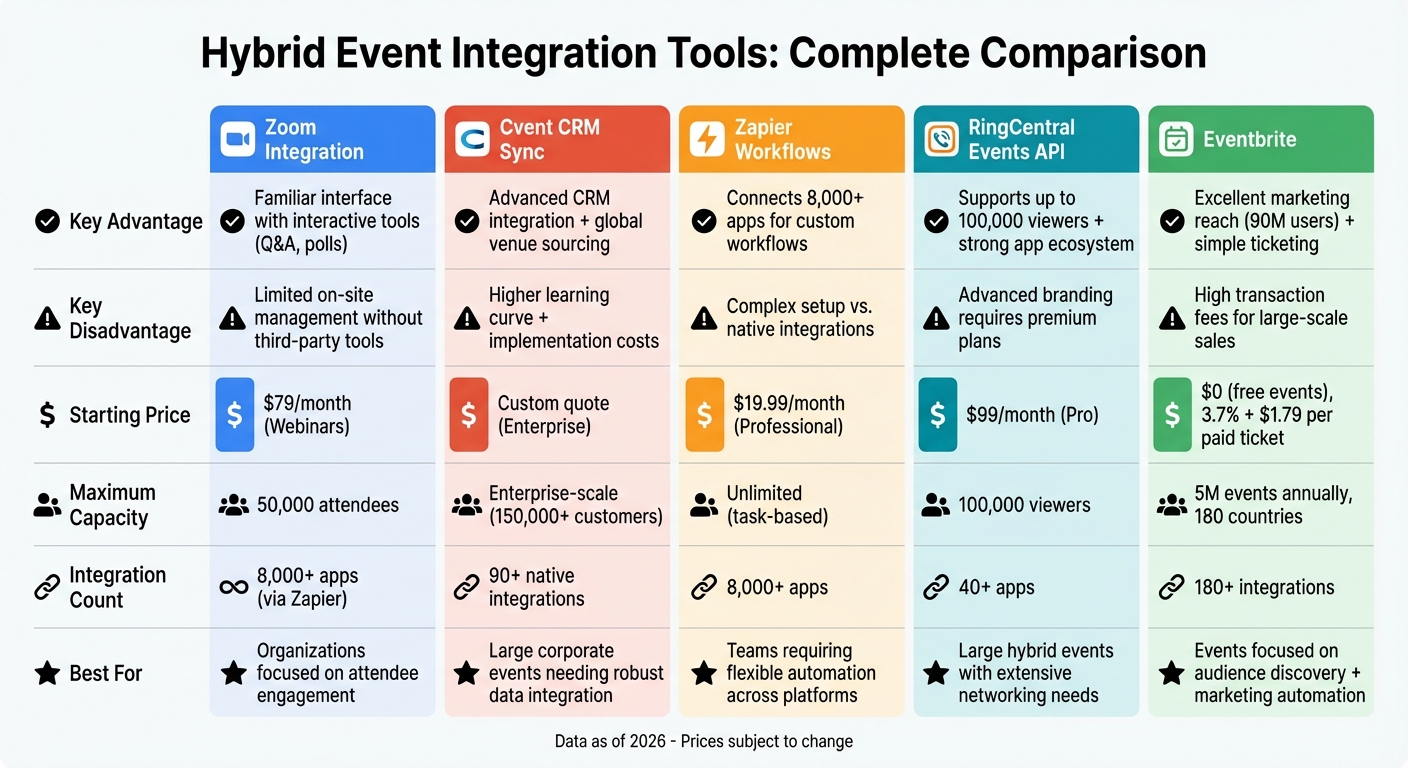
Hybrid Event Integration Tools Comparison: Features, Pricing & Best Use Cases
Choosing the right hybrid event tool depends on your specific needs, budget, and technical requirements. The table below highlights key features, pricing, and capabilities to help you make an informed decision.
| Tool | Key Advantage | Key Disadvantage | Starting Price | Best For |
|---|---|---|---|---|
| Zoom Integration | Familiar interface with interactive tools like Q&A and polls | Limited on-site management without third-party tools | $79/month (Webinars) | Organizations focused on attendee engagement and interaction |
| Cvent CRM Sync | Advanced CRM integration and global venue sourcing | Higher learning curve and implementation costs | Custom quote | Large corporate events needing robust data integration |
| Zapier Workflows | Connects with over 1,000 apps for custom workflows | Setup can be complex compared to native integrations | $500+ (estimated) | Teams requiring flexible automation across platforms |
| RingCentral Events API | Supports up to 100,000 viewers and offers a strong app ecosystem | Advanced branding features require premium plans | $99/month (Pro) | Large hybrid events with extensive networking needs |
| Eventbrite | Excellent marketing reach and simple ticketing system | High transaction fees for large-scale ticket sales | $0 (free events) | Events focused on audience discovery and marketing automation |
Each tool brings distinct strengths to hybrid event planning. For example, Zoom offers simulcasting and seamless registration integration, while Cvent’s Attendee Hub provides a unified data layer for both in-person and virtual engagement, serving over 150,000 customers. RingCentral integrates with more than 40 apps, including Miro and Kahoot, and partners with Boomset for on-site features like badge printing and contactless check-ins.
When it comes to scale, RingCentral Events supports up to 100,000 viewers, while Zoom Events accommodates up to 50,000 attendees. Meanwhile, Eventbrite powers five million events annually across nearly 180 countries.
For pricing, subscription-based tools like Zoom ($79/month) and RingCentral ($99/month) are ideal for frequent event organizers. Eventbrite offers a freemium model with no fees for free events, though paid events incur transaction charges. Cvent, on the other hand, provides custom pricing tailored to enterprise-level needs.
"Integrations Hub has saved our team countless hours. Having attendee data sync automatically has removed so many manual steps and keeps everything consistent." – Lisa Schulteis, ElectraLime Marketing
Ultimately, understanding these differences helps you select the tool that best aligns with your event goals, whether you’re prioritizing engagement, scalability, or seamless integration for both virtual and onsite experiences.
Conclusion
Pick tools that align with your event’s needs, budget, and venue capabilities. As of 2026, 22% of organizations prioritize hybrid meeting support when choosing a venue.
Make sure your tools work together seamlessly. As Kerri Moore, Senior Content Marketing Manager at Bizzabo, explains:
"A patchwork of tools may work for smaller programs, but it often creates friction, data gaps, and inconsistent experiences at scale."
Conduct a thorough tech check at your venue. Confirm bandwidth, ensure onsite support, and schedule a full dress rehearsal two days before the event. These steps are essential for a smooth execution.
Your venue should function like a broadcast studio, featuring multi-camera setups, audio mixing capabilities, and high-speed internet. For instance, venues like Aloft Trophy Club Westlake provide flexible spaces with modern infrastructure, such as the Tactic Meeting Room, which is equipped with cutting-edge technology and dependable connectivity.
"Your physical venue needs more than it did for traditional events… you’re now designing for both cameras and screens, not just the back row of the room." – Zoho Backstage
Hybrid events also bring environmental advantages. Transitioning from an in-person format to hybrid can lower carbon emissions by 67%. By selecting tools and venues that align with your goals, you can create an experience that ensures both in-person and virtual attendees feel equally engaged and valued.
FAQs
What is the best tool for my hybrid event size?
The right tool for your event hinges on its size and specific requirements. Accelevents works well for small to mid-sized gatherings, combining features like registration, streaming, and attendee engagement in one platform. For larger enterprise-level events, Bizzabo stands out with its ability to scale and robust security measures. If you’re looking for a flexible option suitable for events of all sizes, Eventbrite is a solid choice, known for its user-friendly interface and comprehensive feature set.
How do I sync attendee data to my CRM in real time?
To sync attendee data to your CRM instantly, consider using event management platforms that support direct integration or API/webhook functionality. Platforms such as Swapcard, EventMobi, and Accelevents enable seamless data transfer to CRMs like Salesforce or HubSpot. The process usually involves setting up API connections or webhook triggers, ensuring that any updates to attendee details during the event are automatically reflected in your CRM.
What should I test at the venue before a hybrid event?
Before hosting your hybrid event, make sure to test the internet connection thoroughly. It needs to be fast, stable, and exclusively allocated for your event to handle streaming and remote participation without hiccups. Also, inspect the venue’s technical setup – this includes checking audiovisual equipment, ensuring backup systems are in place, and confirming that technical staff will be on hand to assist. Lastly, evaluate the space to ensure it accommodates your audience comfortably and aligns with the event’s flow. Addressing these areas ahead of time can help minimize disruptions and create a seamless experience for everyone involved.