

When planning a workation, the right hotel amenities can make or break your experience. To balance productivity and relaxation, here are the top features to look for:
- High-Speed WiFi: Reliable internet is non-negotiable for video calls, file uploads, and remote work. Aim for at least 100 Mbps download and 20 Mbps upload speeds.
- Ergonomic Workspaces: Comfortable desks and chairs prevent strain during long work hours. Look for natural light, multiple outlets, and quiet setups.
- Coworking Areas: Shared spaces with sit-to-stand desks, private booths, and nearby dining options provide flexibility.
- On-Site Dining: Quick meal options, room service, and in-room coffee stations save time and keep you fueled.
- 24/7 Fitness Centers: Easily maintain your wellness routine with gyms that fit any schedule.
- Quiet Rooms: Soundproof spaces ensure focus and restful sleep, free from distractions.
- Outdoor Pools and Relaxation Spaces: Break up your day with a swim or downtime in WiFi-enabled outdoor areas.
These amenities help you stay productive while enjoying your travel. Before booking, check reviews, confirm amenities directly with the hotel, and choose properties like Aloft Trophy Club Westlake, which cater to remote workers with features like free high-speed WiFi and ergonomic setups.
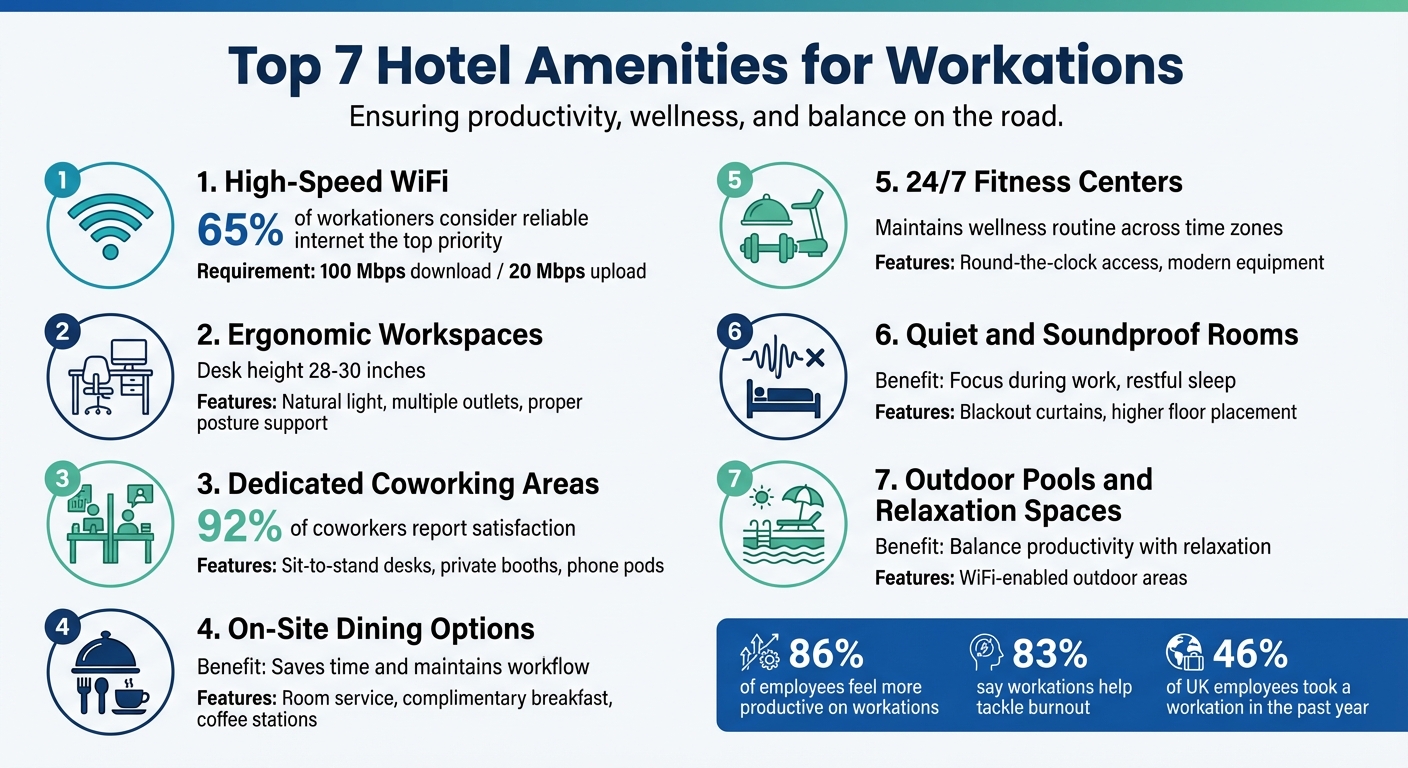
Top 7 Hotel Amenities for Successful Workations
1. High-Speed WiFi
Internet Speed and Reliability
A fast and dependable internet connection is a must-have for any successful workation. In fact, 65% of workationers consider reliable internet the top priority when selecting accommodations. Without it, video calls freeze, file uploads drag, and productivity takes a hit.
Rebecca Lee Armstrong from HighSpeedInternet.com highlights the importance of speed:
Each person working from home needs at least 100 Mbps in download speed and 20 Mbps in upload speed. That will be plenty of speed for video calls, streaming, handling large files, and even running a VPN.
These speeds – 100 Mbps for downloads and 20 Mbps for uploads – are ideal for everything from video conferencing to transferring large files. But here’s the catch: hotel internet speeds can vary wildly depending on the brand and setup.
For the most stable connection, fiber or wired Ethernet is your best bet. If you’re relying on WiFi, look for properties with WiFi 6 or mesh systems, which ensure a strong signal throughout the building .
Before making a reservation, it’s wise to dig into recent reviews for any complaints about weak WiFi. Better yet, call the hotel directly to confirm their current internet speeds. Many places now offer tiered internet services, with a free basic option for light browsing and a premium tier for tasks that require more bandwidth. For instance, Aloft Trophy Club Westlake provides complimentary high-speed WiFi across the entire property, so you won’t have to worry about extra fees or guesswork when planning your workation.
If you plan to host virtual meetings – and 65% of workationers have done so using mobile devices – choose a room on a higher floor or away from busy areas like the pool to avoid network congestion. These small considerations can mean the difference between a seamless video call and a frustrating, pixelated one. Up next, let’s explore how ergonomic workspaces can further enhance your workation experience.
sbb-itb-1e56dfa
2. Ergonomic Workspaces
Comfort and Functionality of Workspaces
While fast and reliable WiFi is key to working remotely, the physical setup of your workspace can make or break your productivity – and your comfort.
A poorly arranged desk isn’t just inconvenient; it can lead to physical strain. Andrea M. Rotondo, Director of Content Operations at The Points Guy, puts it plainly:
A poor desk setup can cause arm, hand, wrist, back and neck pain after prolonged use.
To avoid these issues, aim for a desk height between 28 and 30 inches, which helps maintain proper posture during long hours of work. Pair it with an ergonomic chair from reputable brands like Herman Miller, Serta, or Hbada for optimal support.
Lighting plays a big role, too. Natural light has been shown to enhance focus and productivity, so choosing a room with a balcony or large windows can be a game-changer. For evening work, make sure there’s sufficient overhead or desk lighting to reduce eye strain. And don’t overlook the convenience of multiple power outlets and USB ports within arm’s reach – they’re a must for keeping your devices charged and ready.
Before booking a room, take a close look at the photos. Some spaces might look stylish but lack the functionality needed for extended work sessions. For example, Aloft Trophy Club Westlake offers modern guest rooms with dedicated workspaces, as well as its Tactic Meeting Room equipped with advanced technology for a change of scenery.
If your day involves frequent video calls, a quiet environment is crucial. Request a room on a higher floor, away from elevators and ice machines, to minimize noise disruptions. Some hotels even go the extra mile by providing soundproof "phone booths" with power outlets – perfect for private calls when you need absolute quiet.
Next, let’s explore how coworking spaces can add flexibility to your workation setup.
3. Dedicated Coworking Areas
Comfort and Functionality of Workspaces
Let’s face it – working from your hotel room all day isn’t always ideal. That’s where dedicated coworking areas step in. These spaces are purpose-built for productivity, offering everything from sit-to-stand desks to treadmill desks to help you avoid the pitfalls of sitting too long. If your day is packed with video calls, private phone booths ensure you have a quiet, professional setting without disrupting others.
Connectivity is another must-have. Look for coworking spaces that offer both wireless and wired Ethernet connections. While WiFi is standard, a hardwired connection can be a lifesaver, especially for crucial presentations or uploading large files. And when hunger strikes, having on-site dining options nearby keeps you fueled and focused without breaking your workflow.
Availability of Convenient Dining Options
Dining options within or near coworking spaces can be a game-changer. Self-service coffee stations stocked with locally roasted beans, organic teas, and healthy snacks are a common feature. As Junel Seet from Coworking Resources points out:
Every successful coworking space should try to keep at least some snacks on hand, and you can make this as simple or complex as you want.
Some hotels go the extra mile by offering perks like executive lounge access or discounts on dining. For example, at Aloft Trophy Club Westlake, the W XYZ Lounge provides drinks and light bites, letting you recharge without leaving the property – a lifesaver when you’re on a tight deadline.
Facilities for Relaxation and Recreation
Let’s not forget balance. Long workdays can lead to burnout, which is why many top hotels include wellness features like nap pods, yoga classes, and 24/7 fitness centers. Taking a quick power nap or squeezing in a short workout can do wonders for your focus. It’s no wonder that 92% of coworkers report being satisfied with their coworking spaces – these extras make all the difference during extended work sessions.
4. On-Site Dining Options
Availability of Convenient Dining Options
When you’re on a workation, every minute counts. Having to hunt for meals can disrupt your focus and workflow, but on-site dining takes that hassle out of the equation. It allows you to recharge quickly and get back to work without unnecessary interruptions. This kind of convenience ensures you can dedicate more time to your tasks without the distraction of meal logistics.
Start your day right with a complimentary breakfast and an in-room coffee station. According to GetGoing, having breakfast readily available can save you precious time. For instance, at Aloft Trophy Club Westlake, every room is equipped with a mini-fridge and coffee/tea maker, making it easy to grab a quick snack or drink. Plus, the W XYZ Lounge offers drinks and light bites, perfect for a seamless working lunch. These streamlined dining options are a game-changer for staying productive while keeping yourself nourished.
Room service is another must-have for professionals juggling tight schedules. Engine Marketing highlights that on-site dining is especially helpful for solo travelers or those arriving late. Whether you’re catching up on emails or winding down after a long day, having food just a call away makes all the difference.
5. 24/7 Fitness Centers
Facilities for Relaxation and Recreation
Sitting at a desk all day takes a toll on your health. As Andrea M. Rotondo, Director of Content Operations at The Points Guy, points out, "it’s not healthy to sit at a desk all day long. Whether you’re working at home or elsewhere, it’s wise to break up the day with some exercise". On a workation, having access to a 24/7 fitness center can be a game-changer, helping you stay active and focused.
The round-the-clock availability of these gyms is particularly helpful when juggling time zones or tackling late-night projects. Whether you’re squeezing in a workout at 2:00 AM or starting your day at 6:00 AM, the flexibility ensures your wellness routine doesn’t skip a beat. By 2025, these facilities have shifted from being a luxury to an essential for business travelers. As Engine Marketing aptly puts it, "Travel shouldn’t throw off someone’s wellness routine".
The convenience of a fitness center also makes it easier to balance work and exercise. A quick midday gym session, followed by a refreshing shower in your room, can clear your mind and help you manage stress after hours of virtual meetings. This effortless integration of fitness into your schedule enhances the overall workation experience.
Modern fitness centers go beyond basic equipment. Many now offer extras like in-room yoga mats, filtered water stations, and even local wellness classes to support a healthier lifestyle. For example, the fitness center at Aloft Trophy Club Westlake is designed to provide a space where you can recharge and refocus between work sessions. Amenities like these ensure that your physical well-being keeps pace with your professional goals.
A well-equipped gym isn’t just about staying fit – it’s about maintaining the mental clarity and energy you need to perform at your best.
6. Quiet and Soundproof Rooms
Comfort and Functionality of Workspaces
A productive workation starts with a quiet space that effortlessly supports both focused work and restful sleep. Soundproof rooms are a must for shielding your concentration from the usual culprits – traffic noise, hallway chatter, or nearby events.
Think of it this way: just as an ergonomic chair supports your posture, a soundproof room protects your mental focus. Pair that with blackout curtains, and you’ve got the perfect setup for deep concentration during the day and uninterrupted sleep at night. This combination is especially helpful for professionals juggling time zones, where quality rest and seamless virtual meetings are non-negotiable.
Room location plays a big role, too. Opting for a higher floor reduces street noise from traffic or sirens, while steering clear of areas near pools or outdoor bars keeps distractions to a minimum. Before booking, check guest reviews for noise-related feedback and confirm with the hotel staff that your room will be in a quiet area. Some properties even offer dedicated quiet zones equipped with fast WiFi and plenty of outlets – features that business travelers consistently appreciate.
Take Aloft Trophy Club Westlake, for example. Their modern guest rooms are thoughtfully designed to cater to remote workers. With excellent soundproofing, these rooms transform into more than just a place to sleep – they become a functional office where you can work without interruptions.
Up next, we’ll explore how outdoor amenities can take your workation to the next level.
7. Outdoor Pools and Relaxation Spaces
Facilities for Relaxation and Recreation
Outdoor spaces are more than just a nice perk – they play a key role in balancing productivity with much-needed downtime. Taking a break by the pool can be the perfect way to recharge and keep your energy levels up throughout the day.
Convenience is a big part of the appeal. Imagine stepping out for a quick swim during lunch, then grabbing a shower before diving back into work. Activities like rooftop basketball not only help you burn off some calories but can also sharpen your focus and clear your mind. And when these outdoor spaces are equipped with uninterrupted WiFi, they become even more effective as part of your workation setup.
Many modern hotels now extend high-speed WiFi to outdoor areas, including pool decks and backyard lounges, making it easy to transition between work and relaxation without missing a beat. For example, Aloft Trophy Club Westlake offers an outdoor pool area where you can unwind without disconnecting from your projects. Whether you’re catching up on emails or taking a moment to recharge, this setup blends relaxation with productivity seamlessly.
The best outdoor spaces are those that combine comfort with functionality. Poolside areas that include work-friendly features allow you to strike the perfect balance between taking breaks and staying productive.
37 Things for a Perfect Hotel Room | Ep. #204
Conclusion
The right hotel amenities can make all the difference in your workation experience. Essentials like high-speed WiFi, ergonomic workspaces, and quiet rooms lay the groundwork for a productive remote setup. Meanwhile, extras such as on-site dining, fitness centers, and outdoor pools help you unwind and maintain a healthy work-life balance. Together, these features create the perfect mix of productivity and relaxation.
The numbers back this up: 86% of employees report feeling more productive on workations, and 83% say it helps them tackle burnout effectively. Clearly, the right environment can turn a simple trip into a transformative work experience.
Before booking your next workation, take a few precautions to ensure it’s a success. Check out recent guest reviews, carefully examine workspace photos, and confirm directly with the hotel that key amenities are available.
Consider options like Aloft Trophy Club Westlake, which offers free high-speed WiFi and an outdoor pool – allowing you to recharge without losing your connection to work.
The workation trend shows no signs of slowing down. In fact, 46% of UK employees took a workation in the past year, and many hotels now offer tailored packages starting at around $65 per day. As hotels continue to cater to the needs of remote workers, these amenities are becoming central to the experience. Choose properties that prioritize these features, and you’ll discover how seamlessly productivity and exploration can go hand in hand.
FAQs
What amenities should I look for in a hotel to stay productive during a workation?
Choosing the right hotel for your workation can be the key to balancing productivity and comfort. Start by prioritizing high-speed, reliable Wi-Fi that covers the entire property. This ensures smooth video calls, quick file uploads, and uninterrupted online tasks. Equally important are ergonomic workspaces in guest rooms, featuring comfortable chairs, spacious desks, and plenty of outlets to keep your devices powered.
If you’re planning meetings or team collaborations, look for hotels with dedicated meeting spaces or business centers equipped with presentation tools and video conferencing capabilities. Additionally, on-site dining options like grab-and-go snacks, healthy meals, or complimentary coffee can save you time and keep you energized throughout the day.
To maintain a healthy balance during your stay, consider hotels with wellness amenities such as a fitness center, pool, or quiet spaces for relaxation. For instance, Aloft Trophy Club Westlake offers everything you need: free high-speed Wi-Fi, in-room workstations, meeting spaces, an on-site restaurant and bar, a 24-hour gym, and an outdoor pool. It’s a perfect setup for staying productive while also recharging during your workation.
How can I check if a hotel has reliable Wi-Fi before booking?
When evaluating a hotel’s Wi-Fi, start by visiting their website to look for details like free high-speed internet or business-grade connections. These clues can give you a good sense of what to expect. Guest reviews are another great resource – look for comments about Wi-Fi speed and reliability to get a clearer picture from those who’ve stayed there.
For extra assurance, give the hotel a call. Ask specific questions about average download speeds (like 100 Mbps), whether the coverage is consistent throughout the property, and if the network uses WPA3 encryption for security. Hotels with dedicated business centers or co-working spaces often have more robust networks, making them a great choice if you’re planning a workation. A little research goes a long way in ensuring the Wi-Fi meets your needs.
Why is having an ergonomic workspace essential for working remotely during a workation?
An ergonomic workspace plays a key role in making your workation comfortable and productive. When your workspace is designed to support proper posture, it helps reduce physical discomfort and strain, allowing you to stay focused on your tasks without unnecessary distractions.
A well-thought-out ergonomic setup not only enhances comfort but also promotes efficiency. By minimizing stress on your body, it can help lower tension and improve productivity, ensuring your workation is as enjoyable as it is effective.